![TAI_LOGO_CMYK Option 1.2-03.jpg]](https://learn.tai-software.com/hs-fs/hubfs/TAI_LOGO_CMYK%20Option%201.2-03.jpg?height=40&name=TAI_LOGO_CMYK%20Option%201.2-03.jpg)
Cleaner Commission Numbers on the Profitability Report
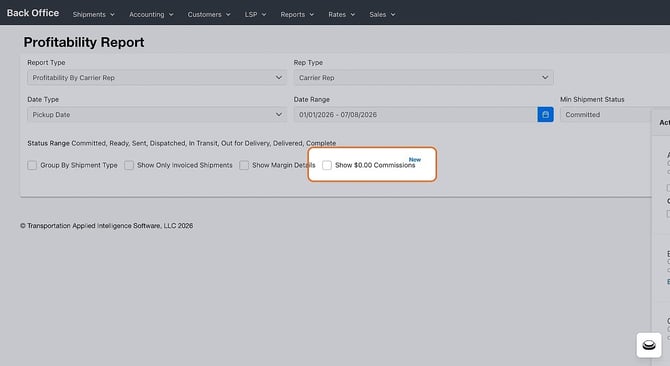
The Profitability Report family now counts only approved commissions, so declined commissions no longer inflate the Commission column or eat into Net Margin — and you stay in control of how $0.00 commissions are handled.
- Declined commissions excluded automatically — Across every profitability view (by Month, Organization, Tariff, Vendor, Sales Rep, Carrier Rep, and Detail), the Commission column and Net Margin reflect approved commissions only.
- You control $0.00 commissions — The new Show $0.00 Commissions filter pulls zero-dollar commissions back into the Sales Rep and Carrier Rep reports for commissions managed outside the TMS.
Capture the Exact Trailer Configuration with the New Accent Field
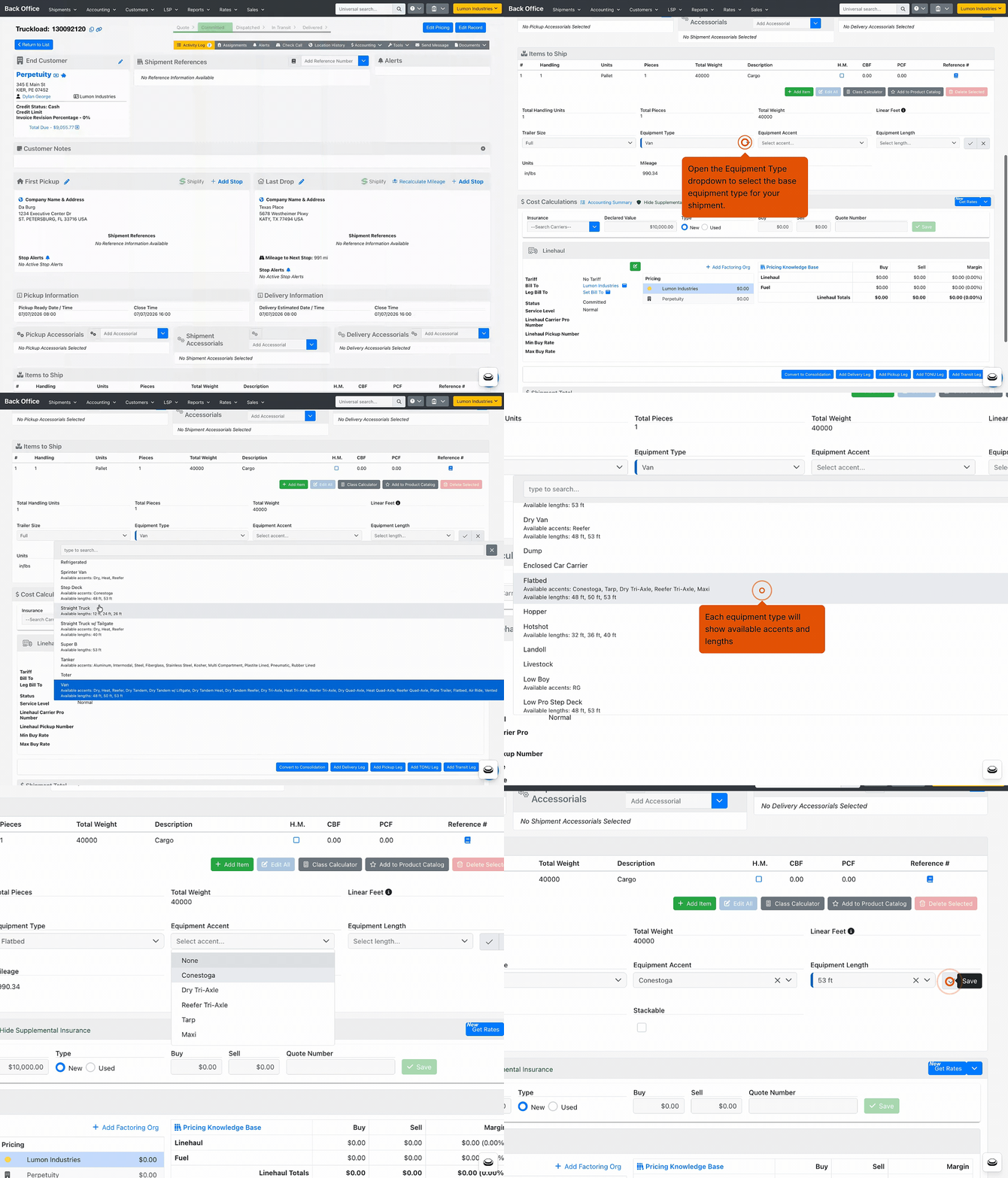
Match freight to the right equipment down to the material or variant. Equipment is now three separate fields — Type, Length, and Accent — so you pick from shorter, cleaner lists and can search, filter, and report on specifics.
- Three fields — On any Truckload or Drayage shipment, choose the Equipment Type first, then set Equipment Accent and Equipment Length. The Accent list reloads to match the Type you chose.
- Works everywhere equipment lives — The three fields appear on Create Shipment, Truckload Quoting, Company Loadboard, Saved Searches, the Shipment Importer, and Custom Reports. Your legacy trailer type still syncs to loadboards and EDI partners automatically.
Add Canadian Taxes Right From the Pricing Screen
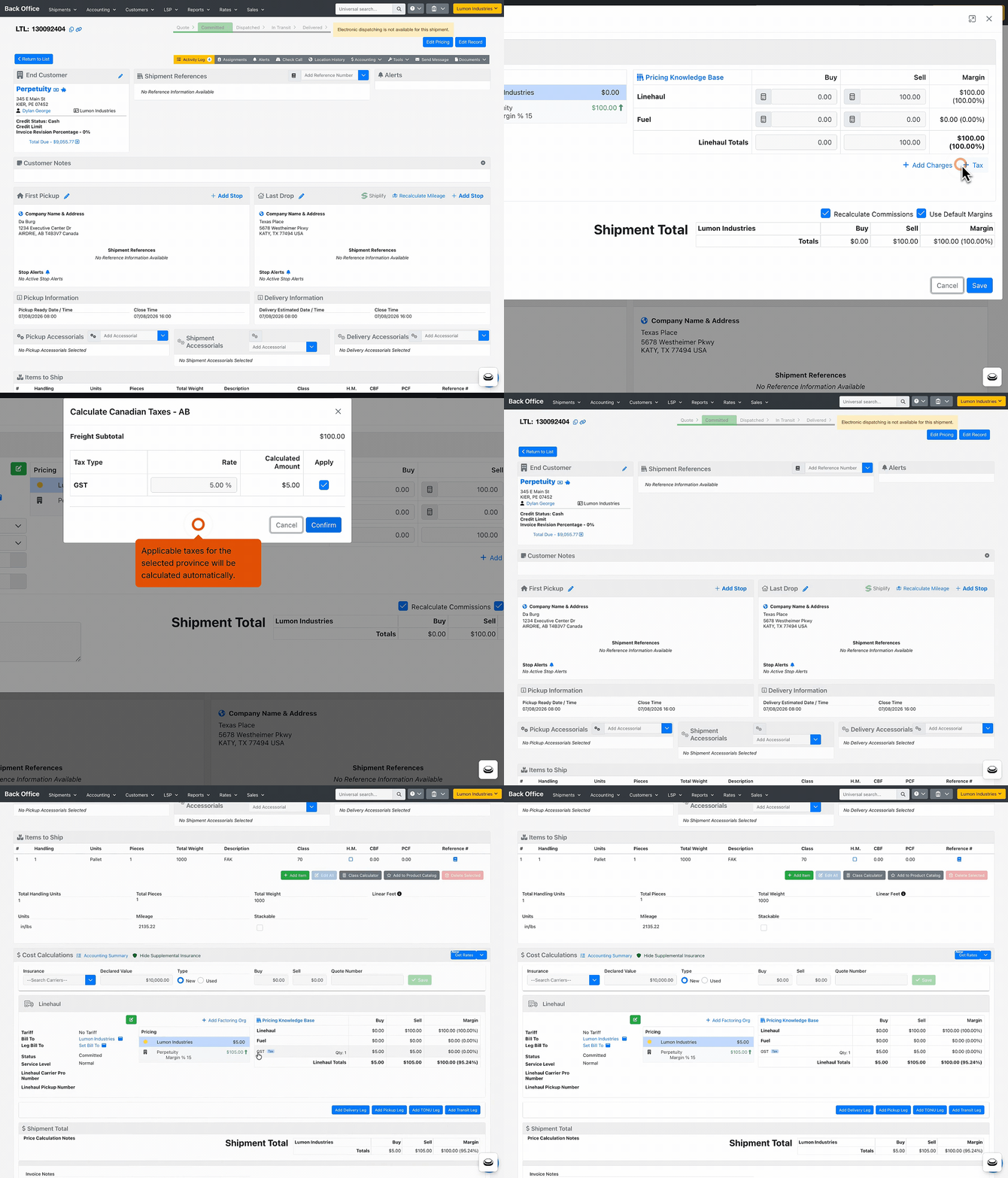
Based on the stop's province, taxes are calculated, and you can add them as their own charge lines so they show separately on your documents.
Chat with Carriers, Drivers, and Customers Right Inside the TMS
-1.gif?width=670&height=595&name=%E2%9C%A8%20Send%20Message%20(3)-1.gif)
Stop bouncing between personal phones and separate apps to text about a load. Send and receive text messages directly from the TMS, with each conversation tied to the shipment so the whole team can see it.
- Your company's own number, fully compliant — Registered brokers text from a provisioned company phone number backed by 10DLC compliance registration, so replies come back into the TMS and land in the shipment activity log.
- Send a text like an email — Open the Send Message modal, enter a phone number in the To field, and type your message or pick a TEXT template. The system suggests numbers and flags whether each belongs to a customer, carrier, or LSP staff.
- Receive replies, too — Incoming texts appear in the shipment activity log alongside your outbound messages, giving you a complete conversation on every load.
Run Workflows on a Recurring Schedule.
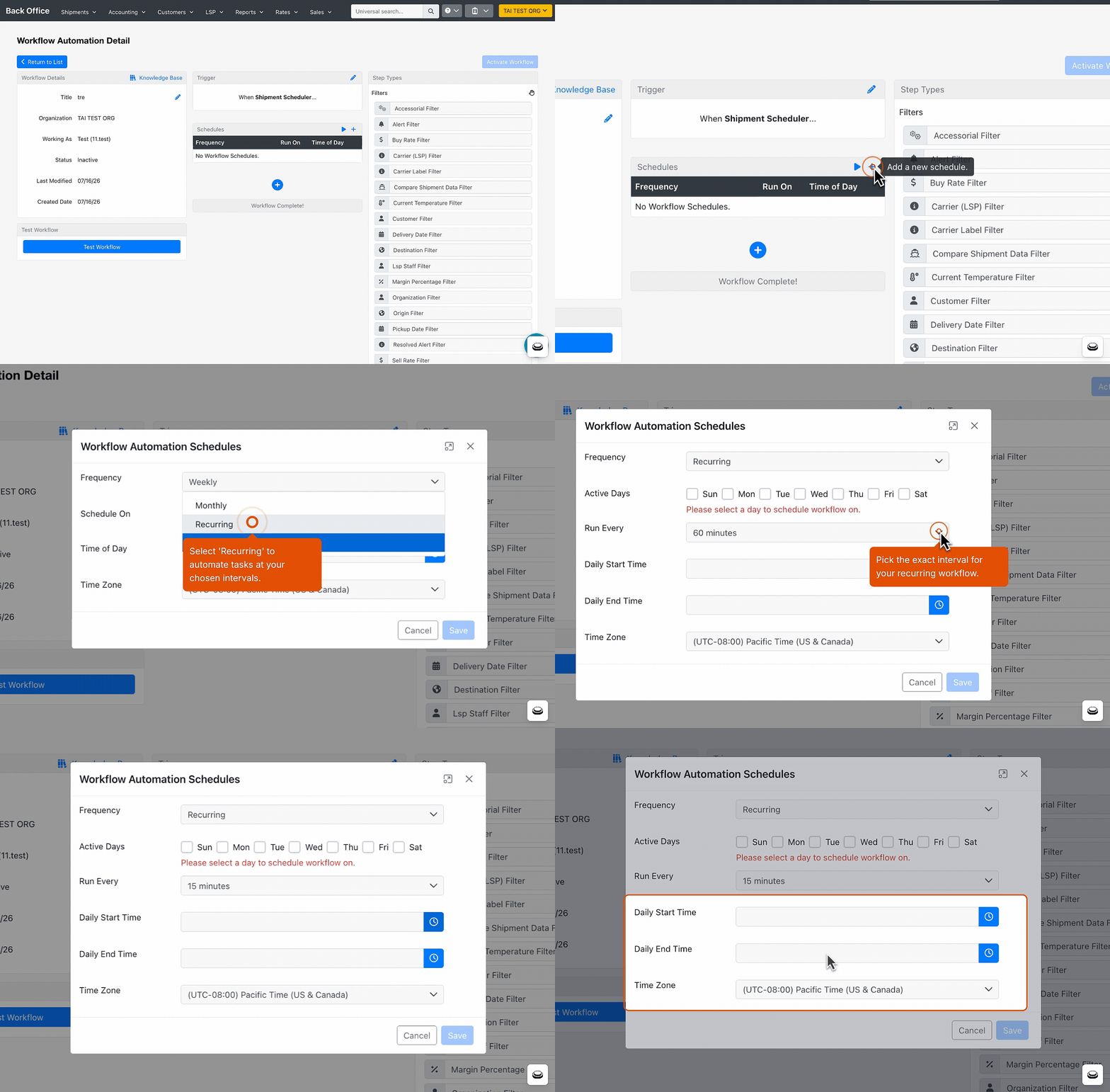
Automate time-sensitive tasks (like checking for carrier updates or sending recurring notifications) on a repeating interval, and keep them to just the days and hours that matter.
- Pick your interval — In the Scheduler trigger, set Frequency to Recurring and choose Run Every 15 / 30 / 45 / 60 minutes.
- Limit it to when it matters — Toggle Active Days (any combo Mon–Sun) and set an optional Daily Start/End Time window.
- Nothing to redo — Your existing fixed-time schedules keep working exactly as before.
Know Where Every Tracking Update Came From
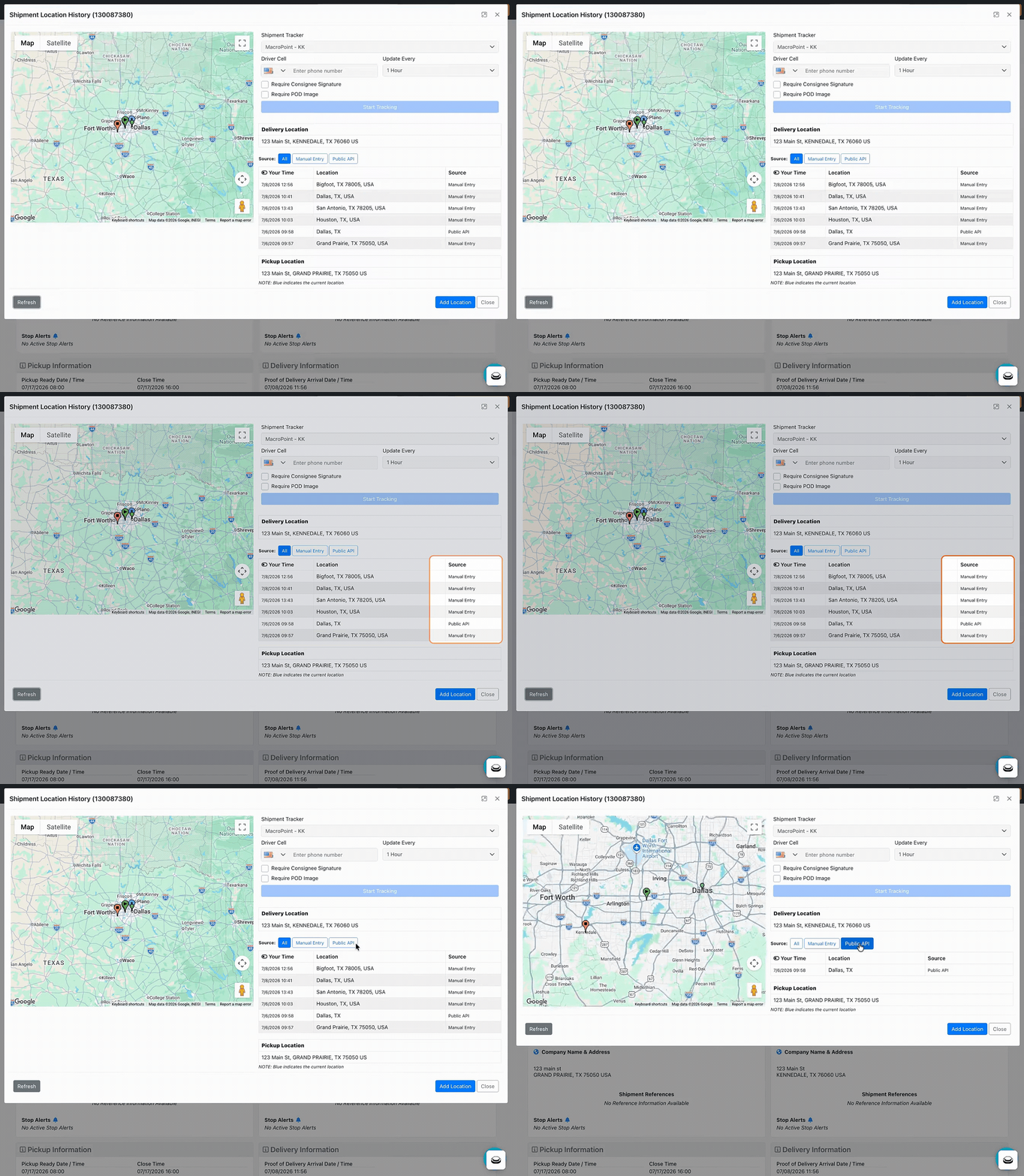
See at a glance whether a location pin came from a carrier's GPS app, a manual check call, or an integration — so you can trust your tracking data and spot gaps fast.
- New Source column — Every entry in Location History shows the system that reported it.
- Filter by source — One-click buttons above the list narrow the updates (and the map pins) to the sources you care about.
- Open it from anywhere — Shipment Detail → Location History, the universal search globe icon, or the Actions menu on the Loadboard / Shipment Search.
Target Your Workflow Automations to Specific Carriers
.gif?width=670&height=387&name=08_04%20Workflow%20Automation_%20LSP%20Carrier%20Filter%20(1).gif)
Scope a workflow so it fires only for the carriers you care about — preferred carriers, a problem carrier, or any group — instead of every shipment.
- New Carrier (LSP) filter — In your Workflow Automation, add the Carrier (LSP) filter to a workflow.
- Multi-select with search — Pick one or more assigned carriers from a searchable dropdown; look them up by name, MC, DOT, or SCAC.
- Contains / Does not contain — Run the workflow when the shipment's carrier is (Contains) or isn't (Does not contain) one of the carriers you selected.
Show the Temperature Requirements on Your Documents
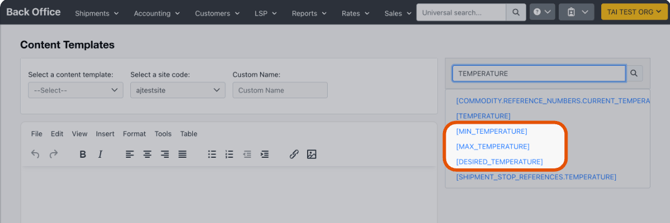
Reefer paperwork can now spell out the target temperature range, so carrier confirmations carry the min, max, and desired temps the load must hold.
- Three new system tags — [MIN_TEMPERATURE], [MAX_TEMPERATURE], and [DESIRED_TEMPERATURE] are available in the System Tag picker of the Content Template editor, next to the existing [TEMPERATURE] tag.
- Pulls from the shipment — Each tag renders that shipment's min / max / desired temperature reference number; if no value is set, the tag renders blank (same as [TEMPERATURE] today).
- Works end to end — Documents such as carrier confirmations that include the tags display the values when generated and sent.
Price Margins From Custom Insurance Values
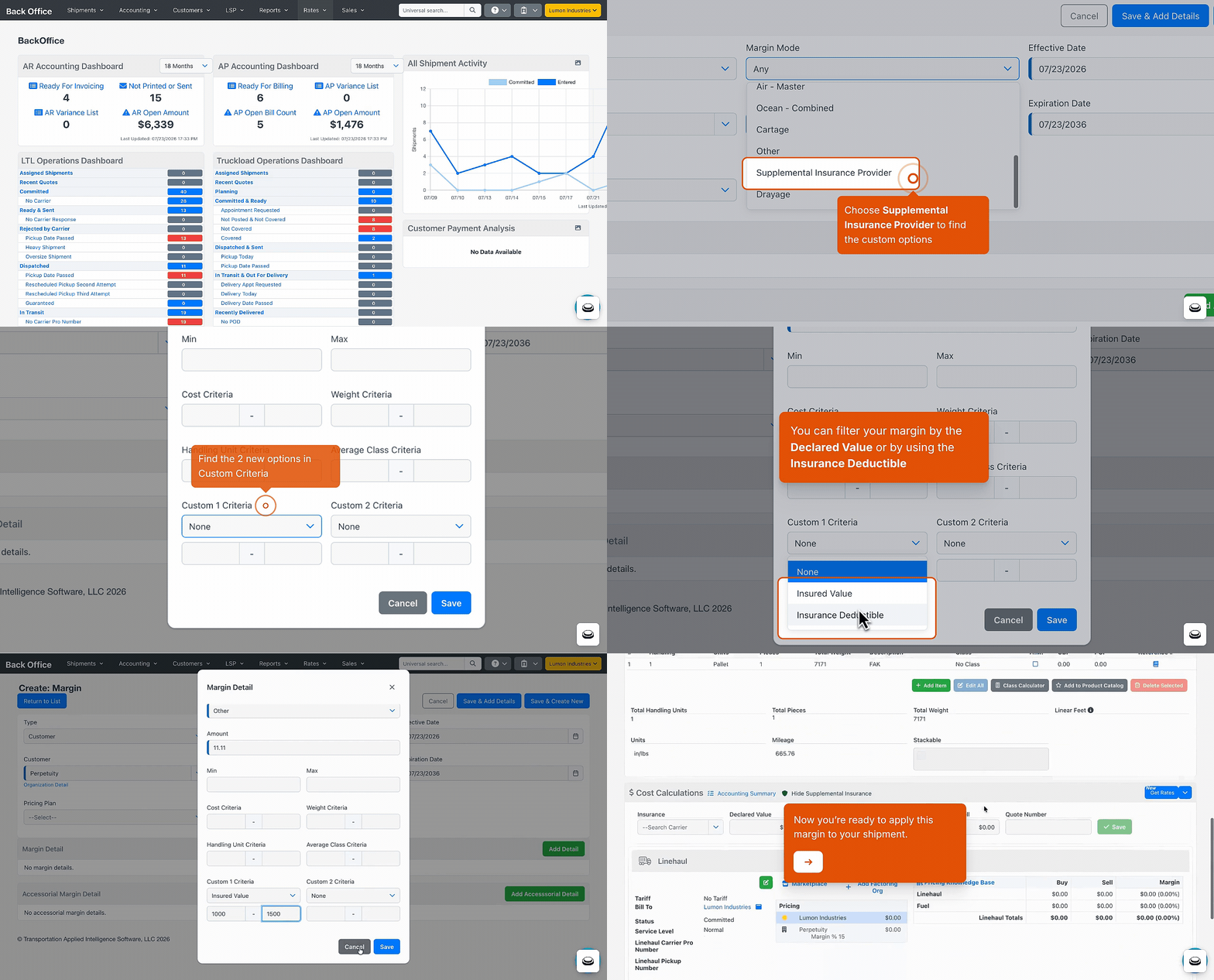
Margin rules can now respond to insurance-based values on the shipment itself.
-
Two new custom criteria — In the margin's details, set a Min/Max on load's declared value and deductible alongside the existing Cost, Weight, Handling Unit, and Average Class criteria.
-
Map each slot to a shipment value — The margin then applies only to shipments whose declared value and deductible fall in the ranges you set.
New Integration: DAT Convoy Marketplace
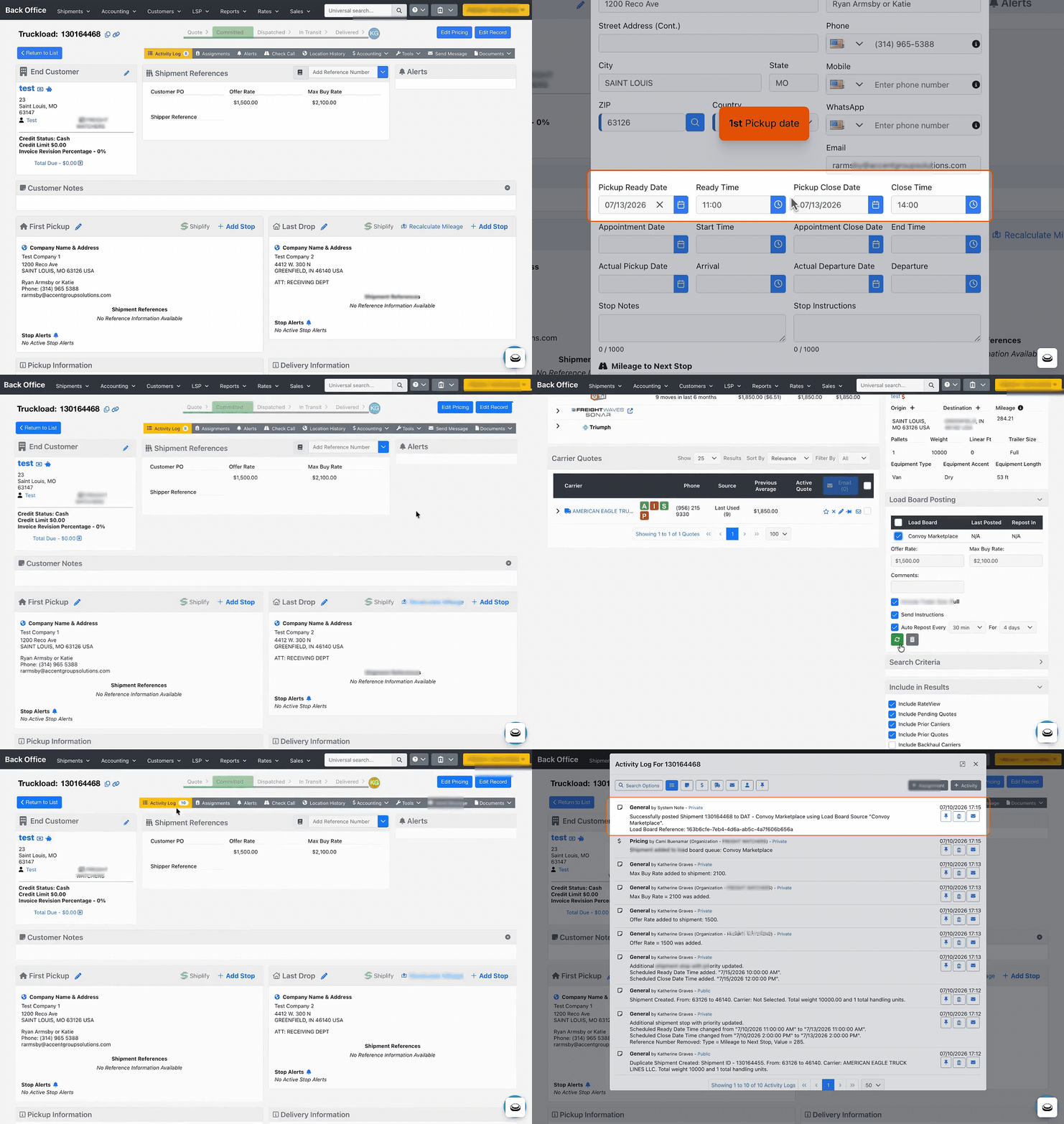
Tender a load to the DAT Convoy marketplace from Tai and let the integration run the whole lifecycle — from carrier assignment through tracking, documents, and payment — all logged on the shipment.
- Post from Truckload Quoting — Send eligible loads to the Convoy marketplace; repost or unpost anytime.
- Hands-off carrier assignment — When a carrier is awarded, Tai assigns them, adds the carrier rep, and sets Convoy as the factoring company.
- Pricing filled in — Linehaul comes back automatically, with Convoy's technology fee as its own charge line.
- Docs attached automatically — Carrier confirmation, plus PODs, BOLs, and lumper receipts once approved on Convoy.
- Live tracking — Driver, trailer, and location updates flow in and move the load through In Transit to Delivered.
- Invoicing end to end — Convoy creates the carrier bill and marks it paid, no manual billing.
Triumph Pay Enhancements

- Integration-Level Bill Eligibility — Control which bills sync to Triumph Pay for your entire integration with one setting. Choose All (every bill syncs — overrides the per-carrier "Ignore Triumph Pay Bill Sync" setting), Non-LTL (skip LTL bills), or Non-Marketplace (skip Marketplace bills). Your existing per-carrier settings still work as an override. Contact Tai Support to turn it on.
- More Control Over GLS Insurance Bills — Ignore GLS insurance bills in the Triumph Pay Bill Sync setting on the QBE carrier profile — set it to True to keep them from syncing.
- Cleaner Credit Note Tracking — When you process a negative bill revision, the matching credit note in Triumph Pay gets linked to the original shipment. Your credit lands on the right load instead of the carrier's next payment batch, making reconciliation easier.
- Billing for Multi-Carrier Shipments — For shipments with more than one carrier, Tai sends a separate load to Triumph Pay for each carrier, containing only that carrier's charge lines under that carrier's payee key. You'll also see one activity-log entry per carrier.
MyCarrierPortal Enhancements

- Carrier profiles stay automatically up to date — Factoring company changes, documents, and payment terms from My Carrier Portal automatically sync to Tai TMS every 15 minutes.
- Complete carrier contacts, synced automatically — Carrier contacts from My Carrier Portal — including Accounting contacts and driver email addresses — import automatically and stay refreshed over time, with smarter matching that prevents duplicate contact records.
Epay Manager: Document Retrieval Control
We're adding a new configuration option for ePay integrations that gives you control over automatic document retrieval.
Existing integrations will not be affected, everything will continue working as-is. If you'd like to turn off automatic document retrieval, you can do so at any time in your integration source settings.
New integrations created after 08/04 will have document retrieval disabled by default.
You will also need to provide your API keys to ePay as part of the setup process.
Heads Up: v1 Public API Endpoints Being Deprecated on September 1st
Several v1 API endpoints have been deprecated and will soon return a Not Found response. If any internal integrations or workflows rely on these, now is the time to move to the v2 APIs.
Affected endpoints:
- /customer/verifyauthentication
- /marketplace/setShipmentStatus/Booked
- /shipping/shipmentStatus
- /shipping/setShipmentStatus/Canceled
- /shipping/setShipmentStatus/Delivered
- /shipping/setShipmentStatus/PickedUp
- /shipping/setShipmentStatus/Booked
- /shipping/customdocumentuploader
- /shipping/bookDomesticShipment