![TAI_LOGO_CMYK Option 1.2-03.jpg]](https://learn.tai-software.com/hs-fs/hubfs/TAI_LOGO_CMYK%20Option%201.2-03.jpg?height=40&name=TAI_LOGO_CMYK%20Option%201.2-03.jpg)
Create Shipments Faster, From Anywhere in the Back Office
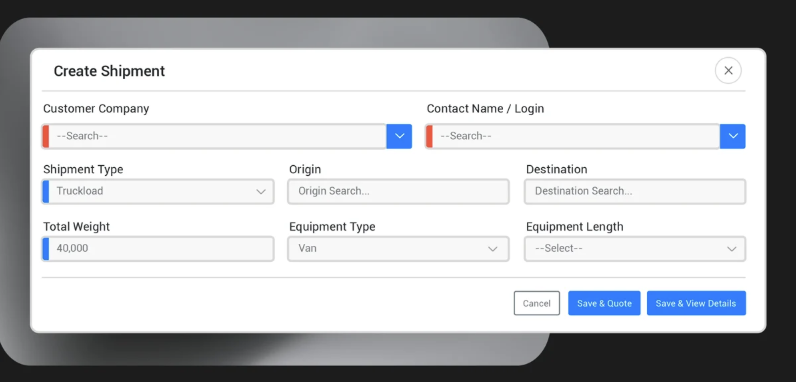
Brokers don't always have every detail when a load comes in. The new Create Shipment modal lets your team get a load into the system from any page, with just enough information to create a working shipment, so nothing slips while you chase down the rest.
- Available from any page, directly from the Shipments menu
- Only the essentials required: customer, contact, shipment type, origin, destination, weight, and equipment
- Template support auto-populates fields using saved customer templates
Duplicate Shipments, Edit Inline, and Move On.gif?width=670&height=421&name=Duplicate%20a%20Shipment%20Record%20(1).gif)
Brokers frequently need to rebook similar loads, whether it's a recurring lane, a re-tendered shipment, or a load that needs to be rebuilt quickly. The improved duplicate workflow skips the full creation flow and lands you directly on the shipment detail page, ready to edit.
- Opens instantly as a new shipment on the detail page, with no creation flow and no extra navigation
- Stops, commodities, equipment, and carriers carry over; pricing, dates, and reference numbers reset for a clean slate
- Triggers an incomplete shipment alert to remind you to add the new details
New Rating Page
.gif?width=670&height=377&name=New%20Rating%20Page%20(1).gif)
Rating is now its own dedicated page, separate from the shipment edit flow. This makes it easier for brokers to get rates, compare options, and set buy/sell pricing without having to edit the full shipment record, saving time and keeping your team moving faster.
- Get Rates button — Access the new Rating page directly from the Cost Calculations section in shipment details
- Compare all available rates in one place — View every carrier quote with buy, sell, margin, transit time, and coverage options in a single list
- Smart summary cards — Quickly spot the Least Cost, Fastest, and Most Coverage options at the top of the results
Inline Accessorials on the Shipment Detail Page
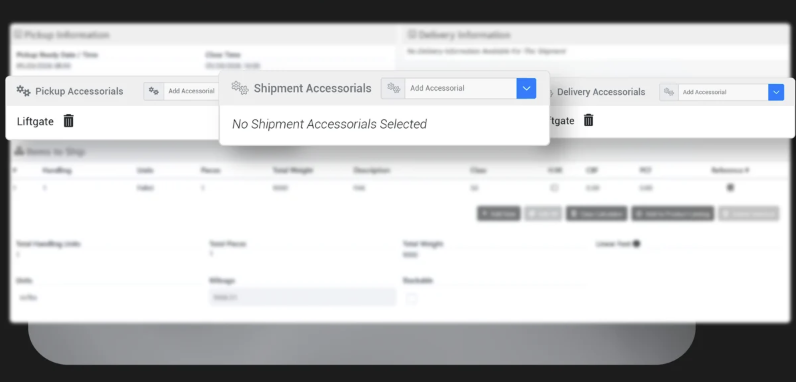
Accessorials can now be managed inline, directly on the Shipment Detail page, without opening the edit record. Add and remove them right where you're working.
- Add accessorials instantly — Search and select Pickup, Shipment, or Delivery accessorials directly on the detail page without opening the edit record
- Remove with ease — Delete accessorials that are no longer needed without leaving the shipment view
Find Shipments Faster with Commodity Marks Search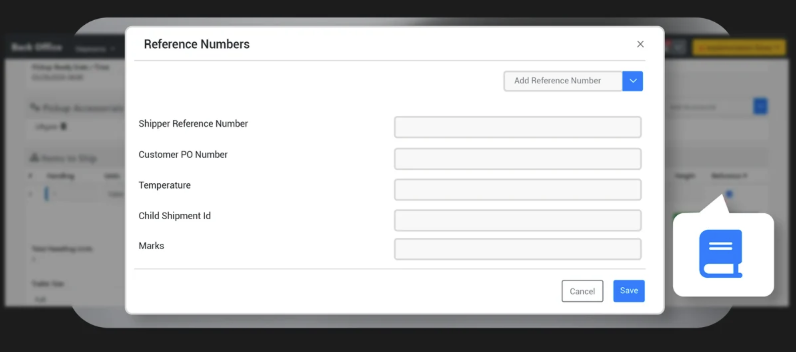
Brokers handling high-value freight rely on commodity serial numbers for tracking and compliance. Marks are now part of the Reference Number system, making them searchable across the platform, so you can stop losing time on manual exports.
- Marks now searchable — Indexed across Universal Search, Shipment Search, and the Company Loadboard
- Search and Loadboard fixes — Commodity Reference Numbers now display and filter correctly
Multi-Customer & Carrier Shipment Import
.gif?width=670&height=468&name=Multiple%20Customer%20and%20Carrier%20Shipment%20Importer%20(5).gif)
Import shipments for multiple customers and carriers in a single file. Just check the new "File contains multiple customers/carriers" box, map your identifiers in the template, and the TMS creates every shipment for you.
- Flexible identifier matching — Specify customers by Customer ID or Customer Reference Number (just one), and carriers by DOT, MC, or SCAC
- Stay in the loop — Add a notification email when you kick off the import, and you'll be alerted as soon as your file is processed and ready
Smarter Workflow Filters for Greater Automation Control
Brokers manage shipments coming in from multiple channels at once, and each entry point often requires a different operational response. Two new Workflow Automation filters let your automations fire with the full picture, knowing where a shipment came from and what's already happened to it.
- Shipment Source Filter — Filter workflows by entry point (Front Office, Back Office, Public API, Email Automation, Import) on the Shipment Created trigger
- Resolved Alert Filter — Use resolved alert history as a workflow condition, with optional date comparison to confirm events were resolved within a set time window
- Not Entered Filter — Catch missing data for date and reference number fields, so you can build automations that detect and act on missing data
- Compare Shipment Data Filter — Evaluate shipment values against each other, so you can act on discrepancies the moment they appear.
More Reporting Power, Right Inside Custom Reports
Enterprise brokers need precise data on dispatch timing, carrier changes, and appointment windows without manual cross-referencing. New data points in Custom Reports let you build the reports your operation actually needs.
- Dispatched Date/Time — When the carrier accepted the electronic tender
- Linehaul Carrier Added Date/Time — When a carrier was added or changed on a shipment
- Appointment Start & End Date/Time — Full window fields for pickup, delivery, and additional stops
- Parent/Child Shipment IDs — Report on split shipments and multi-leg relationships
- Per-Column Date/Time Format — Choose how each date column displays independently
.gif?width=670&height=455&name=Multi%20Currency%20Support%20(3).gif)
Communicate with carriers and customers in their own currency — USD, CAD, or MXN. Set a preferred currency on any carrier or customer profile, drop the new FOREX system tags into your content templates, and we handle the rest: rates refresh automatically every night, and each recipient only sees the conversion that matches their profile.
- Set it once, applied everywhere, with zero manual math
- 31 new FOREX system tags — Convert any buy-side, sell-side, invoice, bill, or AR amount with a single tag
Deeper Container Visibility with OpenTrack

For drayage shipments tracked by master bill, early-stage bookings often have limited data before containers are assigned. These improvements expand what OpenTrack captures automatically, giving teams a more complete picture earlier in the shipment lifecycle.
- Earlier Itinerary Updates — Now subscribed to OpenTrack's shipment-level webhook, capturing ETA/ETD, vessel, voyage, and port changes across all containers on a master bill
- More Fields Captured Automatically — Origin/destination ports, terminals, and additional cutoff dates now flow directly into the shipment from OpenTrack
More Flexibility in How Mileage is Calculated with PC Miler
Brokers using PC Miler can now define their own route parameters through Integration Source Settings, configuring mileage their way with no code changes required.
- Custom Mileage Parameters — Define Integration Source Settings using the pattern MileageReport_{ParameterName} to append query parameters to the PC Miler mileage API call
- Example — Setting MileageReport_RouteType to Fastest tells PC Miler to calculate using the fastest route
Shiplify LTL Behavior Alignment
Shiplify behavior on the Shipment Detail page has been aligned with the full inline editing workflow, so suggested accessorials are applied automatically for LTL shipments.
- LTL auto-apply — When you click Shiplify on an LTL shipment, suggested accessorials are automatically added, with no extra steps needed
- TL and other modes unchanged — Shiplify continues to display suggestions in the modal without auto-applying for non-LTL shipment types
Heads Up: v1 Public API Endpoints Being Deprecated on June 30th
Several v1 API endpoints have been deprecated and will soon return a Not Found response. If any internal integrations or workflows rely on these, now is the time to move to the v2 APIs.
Affected endpoints:
- /customer/verifyauthentication
- /marketplace/setShipmentStatus/Booked
- /shipping/shipmentStatus
- /shipping/setShipmentStatus/Canceled
- /shipping/setShipmentStatus/Delivered
- /shipping/setShipmentStatus/PickedUp
- /shipping/setShipmentStatus/Booked
- /shipping/customdocumentuploader
- /shipping/bookDomesticShipment