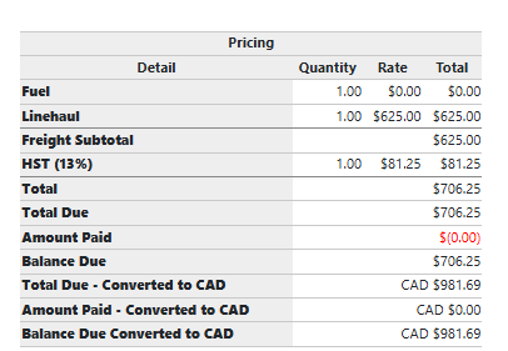
![TAI_LOGO_CMYK Option 1.2-03.jpg]](https://learn.tai-software.com/hs-fs/hubfs/TAI_LOGO_CMYK%20Option%201.2-03.jpg?height=40&name=TAI_LOGO_CMYK%20Option%201.2-03.jpg)
Supported currencies: USD (default), CAD, MXN. Exchange rates are refreshed automatically every night, no manual updates are needed.
Setting a Carrier's Preferred Currency
The preferred currency for a carrier is configured on the LSP Carrier Profile, in the Accounts Payable section.
- Navigate to LSP → Carriers and open the carrier record.
- Click Edit.
- In the Accounts Payable section, locate the Currency dropdown.
- Select USD, CAD, or MXN.
- Save the carrier profile.
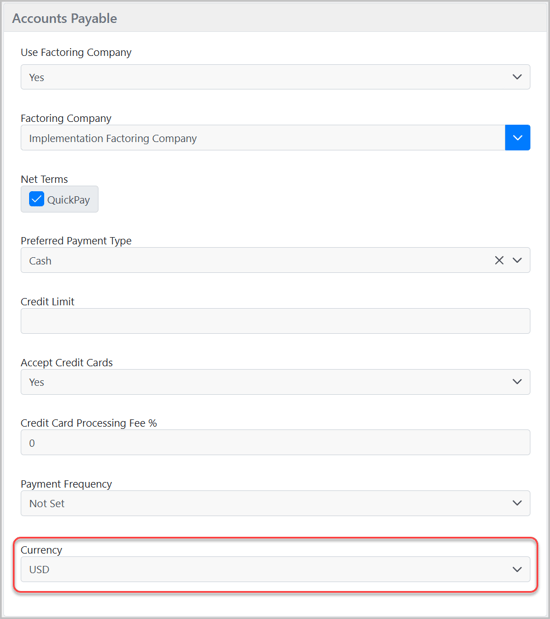
This currency setting is used when FOREX tags appear on carrier-facing documents such as carrier confirmations and bill documents.
Setting a Customer's Preferred Currency
The preferred currency for a customer is configured on the Customer Accounting Profile. This setting is only available at the Customer level (not the LSP or branch level).
- Navigate to the customer record in the Back Office.
- Open the Accounting Profile.
- Locate the Currency dropdown.
- Select USD, CAD, or MXN.
- Save the profile.
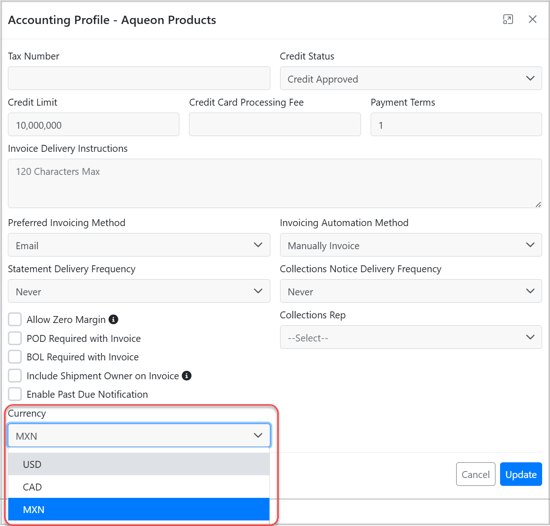
This currency setting is used when FOREX tags appear on customer-facing documents such as invoices, AR statements, and rate quotes.
Using Currency Tags in Document Templates
TMS provides a set of FOREX system tags that convert USD amounts into the carrier's or customer's configured currency. These tags can be used in:
- Carrier Confirmations
- Customer Invoices
- AR Statements
- Consolidated Invoices
- Rate Quotes
- Email Templates
- Internal Alert Emails
- Generated PDF Documents
- Send Message Templates
If no preferred currency is set on the carrier or customer profile, all FOREX tags default to USD.
Available Tags
How exchange rates are determined: By default, all FOREX tags use the exchange rate for the shipment's pickup ready date. You can override this by supplying a specific date tag as a second parameter — for example, the invoice date or bill date. The system looks up the most recent cached rate on or before the date provided.
Example: [FOREX_LOCAL_CURRENCY([TOTAL_SELL], [INVOICE_DATE])] — converts the sell total using the exchange rate on the invoice date instead of the pickup ready date.
[FOREX_LOCAL_CURRENCY_CODE]
Outputs the currency code label (e.g., CAD, MXN, USD). Use this anywhere you want to identify the currency without converting an amount.
Example output: CAD
[FOREX_LOCAL_CURRENCY([AMOUNT_TAG])]
Converts the given amount tag to the configured currency using the exchange rate for the shipment's pickup-ready date. This is the default behavior when no date is specified.
Example: [FOREX_LOCAL_CURRENCY([TOTAL_SELL])] Example output: 2,070.00 (if $1,500.00 USD × 1.38 CAD on pickup ready date)
[FOREX_LOCAL_CURRENCY([AMOUNT_TAG], [DATE_TAG])]
Converts the given amount tag using the exchange rate on a specific date, overriding the default pickup ready date. The system looks up the most recent cached rate on or before the date provided.
Example: [FOREX_LOCAL_CURRENCY([TOTAL_BUY], [BILL_DATE])]
Example output: 1,596.00 (if $1,200.00 USD × 1.33 CAD on bill date)
If the date tag does not resolve to a valid date, the system falls back to the shipment pickup ready date.
[FOREX_LOCAL_CURRENCY([AMOUNT_TAG], [DATE_TAG], true)]
Same as above, but appends the currency code to the output. Use this on documents that show both carrier and customer amounts so each value is clearly labeled.
Example: [FOREX_LOCAL_CURRENCY([TOTAL_SELL], [INVOICE_DATE], true)]
Example output: 2,025.00 CAD
How Currency Is Determined Per Tag
The currency used for conversion is determined by the tag type, not the document type:
- Buy-side tags (
[TOTAL_BUY],[TOTAL_BUY_LINEHAUL_CARRIER],[TOTAL_BUY_PICKUP_CARRIER],[TOTAL_BUY_DELIVERY_CARRIER],[TOTAL_BUY_TONU_CARRIER], etc.) — always use the carrier's preferred currency - Sell-side tags (
[TOTAL_SELL],[TOTAL_SELL_LINEHAUL],[TOTAL_SELL_FUEL], etc.) — always use the customer's preferred currency - Margin tags (
[TOTAL_MARGIN]) — resolved in the customer's currency
This means a single document can display amounts in two different currencies simultaneously. Internal Alert Emails are a common example, where Customer Price, Payable, and Profit Margin all appear on the same document:
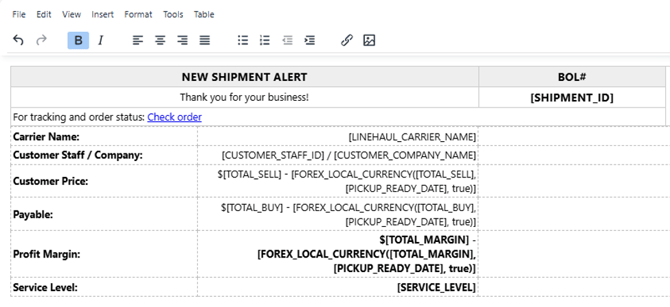
In this example, the Customer Price conversion uses the customer's currency (e.g., CAD), while the Payable conversion uses the carrier's currency (e.g., MXN) — even on the same document.
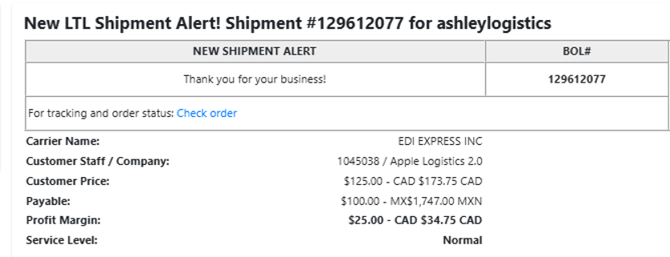
Always use the true parameter on documents that mix buy and sell amounts. This appends the currency code inline (e.g., 2,070.00 CAD, 1,656.00 MXN) so recipients can identify which currency each value represents.
Carrier Confirmations — Leg-Specific Currency
On multi-leg shipments, each carrier confirmation uses the preferred currency of the carrier assigned to that specific leg — not the linehaul carrier's currency:
- Pickup confirmation — Pickup carrier's currency
- Delivery confirmation — Delivery carrier's currency
- TONU confirmation — TONU carrier's currency
- Linehaul confirmation — Linehaul carrier's currency
Use the corresponding leg-specific tag to ensure the correct amount and currency are displayed for each leg.
Recommended Date Tag by Document Type
Always include a date parameter to ensure the correct historical rate is used.
|
Document Type |
Recommended Date Tag |
Reason |
|
Customer Invoice |
|
Ties rate to invoice creation date |
|
Consolidated Invoice |
|
Ties rate to invoice creation date |
|
Carrier Confirmation — Pickup / TONU |
|
Ties rate to pickup date |
|
Carrier Confirmation — Delivery |
|
Ties rate to delivery date |
|
Carrier Confirmation — Linehaul |
|
Ties rate to pickup date |
|
AR Statement |
|
All tags must use the same date for consistency |
|
Carrier Bill |
|
Ties rate to bill date |
|
Internal Alert Email |
|
Ties rate to pickup date |
Full Tag Reference
Sell-Side Tags (Customer Currency)
|
Tag |
Description |
|
|
Total sell |
|
|
Linehaul sell |
|
|
Fuel sell |
|
|
Accessorial sell |
|
|
Pickup sell |
|
|
Delivery sell |
|
|
All legs sell |
Buy-Side Tags (Carrier Currency)
|
Tag |
Description |
|
|
Total buy |
|
|
Buy amount for the current leg (leg-scoped documents only) |
|
|
Linehaul leg buy |
|
|
Pickup leg buy |
|
|
Delivery leg buy |
|
|
TONU leg buy |
|
|
All legs buy |
|
|
Fuel buy |
|
|
Accessorial buy |
|
|
Insurance buy |
Invoice Tags (Customer Currency)
|
Tag |
Description |
|
|
Invoice total |
|
|
Payment amount applied |
|
|
Balance remaining |
Bill Tags (Carrier Currency)
|
Tag |
Description |
|
|
Bill total |
|
|
Bill balance remaining |
AR Statement Tags (Customer Currency)
|
Tag |
Description |
|
|
Total amount due |
|
|
Current (not past due) |
|
|
30-day past due bucket |
|
|
60-day past due bucket |
|
|
90-day past due bucket |
|
|
90+ day past due bucket |
Document-Specific Notes
Customer Invoice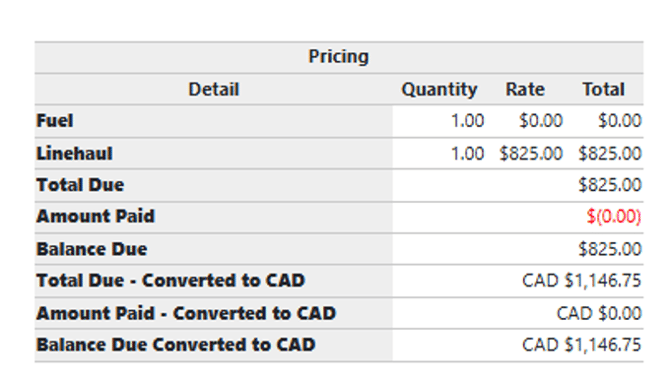
Use [INVOICE_DATE] as the date parameter. All three invoice amount tags are supported inside [FOREX_LOCAL_CURRENCY()]:
Total Due:              $[INVOICE_AMOUNT_TOTAL]
Amount Paid:       $([INVOICE_PAYMENT_AMOUNT])
Balance Due:       $[INVOICE_BALANCE_DUE]

Rate (Converted):     [FOREX_LOCAL_CURRENCY([INVOICE_AMOUNT_TOTAL], [INVOICE_DATE], true)]
Amount Paid (Conv.):  [FOREX_LOCAL_CURRENCY([INVOICE_PAYMENT_AMOUNT], [INVOICE_DATE], true)]
Balance Due (Conv.):  [FOREX_LOCAL_CURRENCY([INVOICE_BALANCE_DUE], [INVOICE_DATE], true)]
Carrier Confirmation
Use the leg-specific buy tag that matches the confirmation type. All leg-specific tags are available as selectable fields in the carrier confirmation template editor.
Total:       $[TOTAL_BUY_PICKUP_CARRIER]
Conversion:  [FOREX_LOCAL_CURRENCY([TOTAL_BUY_PICKUP_CARRIER], [PICKUP_READY_DATE], true)]
Consolidated Invoice
Use [INVOICE_DATE] as the date parameter. The [EACH]([CONSOLIDATED_INVOICE_RECORD]) block is required to repeat per-invoice rows.
Total Due: [FOREX_LOCAL_CURRENCY([INVOICE_AMOUNT_TOTAL], [INVOICE_DATE], true)]Balance Due: [FOREX_LOCAL_CURRENCY([INVOICE_BALANCE_DUE], [INVOICE_DATE], true)]
AR Statement
Important: All FOREX conversions on an AR Statement use the date the statement is generated ([TODAYS_DATE]), regardless of the date tag specified in the template. This is applied automatically by the system to ensure the sum of individual converted invoice amounts always matches the converted total. Use [TODAYS_DATE] as the date parameter on all statement FOREX tags.
AR Statement — Recommended Template
The following is the recommended template for AR Statement documents with full FOREX support. Key points:
- All conversion rows use
[TODAYS_DATE]to ensure consistent rates across the document - Conversion label displays today's date (not the individual invoice date) to accurately reflect the rate used
- All aging bucket amounts include a conversion row
- Currency code is appended inline on all converted amounts using the
trueparameter
<!-- ****EMAIL Invoice Html**** -->
<style><!--
body { font-family: Verdana; font-size: 14px; }
#Header { height: 200px; }
#Header table, #Info table, #OpenInvoices table, #AmountDue table {
width: 100%; border-collapse: separate !important; border-spacing: 3px;
}
#Header th, #Header td, #OpenInvoices th, #OpenInvoices td, #AmountDue th, #AmountDue td {
border: #c9c9c9 1px solid; -moz-border-radius: 3px; border-radius: 3px; padding: 4px;
}
#Header th, #OpenInvoices th, #AmountDue th {
border: #c9c9c9 1px solid; background-color: #eeeeee;
}
#Container { width: 1024px; }
#Logo { float: left; width: 38%; }
#PayableTo { float: left; width: 32%; }
#Spacer { float: left; width: 5%; }
#BillTo { float: left; width: 33%; }
#Title { float: left; width: 33%; }
#Info { float: left; width: 29%; }
#AmountDue { float: left; width: 33%; }
#AmountDue td, .currency { text-align: right; }
#StatementDetails { min-height: 150px; }
#Signature { float: left; width: 69.6%; }
#Terms { text-align: center; font-weight: bold; font-size: 18px; }
#FinePrint p { margin: 0; padding: 0; text-align: center; font-size: 9px; }
.ClearFloat { clear: both; }
.conversion-row td {
background-color: #f5f5f5; font-size: 12px; color: #555; font-style: italic;
}
--></style>
<div id="Container">
<div id="Header">
<div id="Logo"><img src="[SITE_LOGO_URL]" alt=""></div>
<div id="PayableTo"><strong>Payable To:</strong><br>[SITE_OWNER_NAME]<br>
[SITE_OWNER_ADDRESS1][SITE_OWNER_ADDRESS2]<br>
[SITE_OWNER_CITY], [SITE_OWNER_STATE] [SITE_OWNER_ZIPCODE]<br>
Tel. [SITE_OWNER_PHONE]<br>Fax: [SITE_OWNER_FAX]</div>
<div id="Info">
<table><tbody>
<tr><th>Statement Date</th><td>[TODAYS_DATE]</td></tr>
</tbody></table>
</div>
</div>
<div id="BillTo"><strong>Bill To:</strong><br>[PAYER_BILLING_ADDRESS_FORMATTED]</div>
<div id="Title"><h1>STATEMENT</h1></div>
<div id="StatementDetails">
<div id="Spacer"> </div>
<div id="AmountDue">
<table style="width: 100.025%;"><tbody>
<tr>
<th style="width: 56%;">Amount Due (USD)</th>
<th style="width: 35%;">Enclosed</th>
</tr>
<tr>
<td style="width: 56%;">[AMOUNT_DUE]</td>
<td style="width: 35%;"> </td>
</tr>
<tr>
<th style="width: 56%;">Amount Due ([FOREX_LOCAL_CURRENCY_CODE])</th>
<th style="width: 35%;"></th>
</tr>
<tr>
<td style="width: 56%;">[FOREX_LOCAL_CURRENCY([AMOUNT_DUE], [TODAYS_DATE], true)]</td>
<td style="width: 35%;"></td>
</tr>
</tbody></table>
</div>
</div>
<div id="OpenInvoices" class="ClearFloat"><br>
<table style="border-collapse: collapse; width: 100%;"><tbody>
<tr>
<th style="text-align: center; width: 10%;">Date</th>
<th style="text-align: center; width: 12%;" colspan="2">Invoice Number</th>
<th style="text-align: center; width: 10%;">Pro Number</th>
<th style="text-align: center; width: 10%;">PO Number</th>
<th style="text-align: center; width: 10%;">Shipper Ref #</th>
<th style="text-align: center; width: 10%;">Due Date</th>
<th style="text-align: center; width: 14%;">Amount (USD)</th>
<th style="text-align: center; width: 14%;">Open Amount (USD)</th>
</tr>
<!-- [EACH]([STATEMENT_INVOICE_RECORD]) -->
<tr>
<td style="text-align: center;">[STATEMENT_INVOICE_RECORD.INVOICE_DATE]</td>
<td style="text-align: center;" colspan="2">[STATEMENT_INVOICE_URL]</td>
<td>[STATEMENT_INVOICE_RECORD.PRO_NUMBER] </td>
<td><div style="width: 170px; word-wrap: break-word; display: inline-block;">[STATEMENT_INVOICE_RECORD.PURCHASE_ORDER_NUMBER]</div></td>
<td><div style="width: 170px; word-wrap: break-word; display: inline-block;">[STATEMENT_INVOICE_RECORD.SHIPPER_REFERENCE_NUMBER]</div></td>
<td>[STATEMENT_INVOICE_RECORD.INVOICE_DUE_DATE]</td>
<td class="currency">[STATEMENT_INVOICE_RECORD.AMOUNT]</td>
<td class="currency">[STATEMENT_INVOICE_RECORD.OPEN_AMOUNT]</td>
</tr>
<tr class="conversion-row">
<td colspan="7" style="text-align: right; padding-right: 8px;">
Converted ([FOREX_LOCAL_CURRENCY_CODE]) as of [TODAYS_DATE]:
</td>
<td class="currency">[FOREX_LOCAL_CURRENCY([STATEMENT_INVOICE_RECORD.AMOUNT], [INVOICE_DATE], true)]</td>
<td class="currency">[FOREX_LOCAL_CURRENCY([STATEMENT_INVOICE_RECORD.OPEN_AMOUNT], [INVOICE_DATE], true)]</td>
</tr>
<!-- [ENDEACH] -->
</tbody></table>
<table style="border-collapse: collapse; margin-top: 15px; width: 100%;"><tbody>
<tr>
<th style="text-align: center; width: 12%;">Current Due</th>
<th style="text-align: center; width: 12%;">30 Days</th>
<th style="text-align: center; width: 12%;">60 Days</th>
<th style="text-align: center; width: 12%;">90 Days</th>
<th style="text-align: center; width: 12%;">90+ Days</th>
<th style="text-align: center; width: 12%;">Amount Due</th>
</tr>
<tr>
<td class="currency">[CURRENT_DUE]</td>
<td class="currency">[THIRTY_PAST_DUE]</td>
<td class="currency">[SIXTY_PAST_DUE]</td>
<td class="currency">[NINETY_PAST_DUE]</td>
<td class="currency">[OVER_NINETY_PAST_DUE]</td>
<td class="currency">[AMOUNT_DUE]</td>
</tr>
<tr class="conversion-row">
<td class="currency">[FOREX_LOCAL_CURRENCY([CURRENT_DUE], [TODAYS_DATE], true)]</td>
<td class="currency">[FOREX_LOCAL_CURRENCY([THIRTY_PAST_DUE], [TODAYS_DATE], true)]</td>
<td class="currency">[FOREX_LOCAL_CURRENCY([SIXTY_PAST_DUE], [TODAYS_DATE], true)]</td>
<td class="currency">[FOREX_LOCAL_CURRENCY([NINETY_PAST_DUE], [TODAYS_DATE], true)]</td>
<td class="currency">[FOREX_LOCAL_CURRENCY([OVER_NINETY_PAST_DUE], [TODAYS_DATE], true)]</td>
<td class="currency">[FOREX_LOCAL_CURRENCY([AMOUNT_DUE], [TODAYS_DATE], true)]</td>
</tr>
</tbody></table>
</div>
</div>
Internal Alert Emails
FOREX tags work on internal alert emails. Because these documents often include both buy and sell amounts, currency is determined per tag type (buy = carrier, sell = customer). Always use the true parameter to label each amount with its currency code
When to Use the true Parameter
Use true (append currency code) when a single document shows both carrier and customer amounts. This makes it clear which currency each value represents.
- Single-party document (e.g., customer invoice only): omit
true→2,040.00 - Combined document (carrier + customer amounts): use
true→2,040.00 CAD/1,632.00 CAD
true — amounts from multiple invoices need clear currency labelingMulti-Currency Tax Support (Coming Soon)
When working with Canadian carriers and customers, TMS now calculates and applies Canadian sales taxes (GST, HST, PST) directly on the shipment's pricing — no manual rate lookups or separate calculations needed. A + Tax button on the Edit Pricing modal opens the Tax Calculator, which automatically fetches the correct rates for the destination province and adds the appropriate tax charge lines to the shipment in one step.
Supported Canadian tax types:
- GST — Goods and Services Tax (federal, 5%)
- HST — Harmonized Sales Tax (replaces GST + PST in participating provinces; 13–15% depending on province)
- PST — Provincial Sales Tax (varies by province; also used for Quebec's QST at 9.975%)
How to apply Canadian taxes to a shipment
- Open the shipment and click Edit Pricing.
- Select the pricing leg.
- Click + Tax. The Tax Calculator modal opens showing the freight subtotal for the leg and the applicable tax rates for the destination province.
- Review rates — they are pre-filled from the province's current tax schedule and are editable before applying.
- Check the tax types you want to apply and click Confirm.
The + Tax button only appears on shipments with at least one Canadian stop. It is not available on US-only shipments or after an invoice has been created.
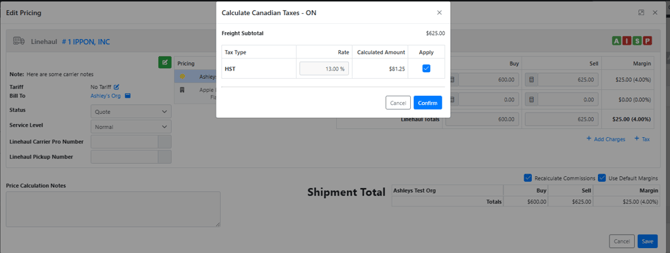
Tax rates by province
- Ontario (ON): HST 13%
- British Columbia (BC): GST 5% + PST 7%
- Alberta (AB): GST 5% only
- Quebec (QC): GST 5% + PST/QST 9.975%
- New Brunswick, Nova Scotia, Newfoundland, Prince Edward Island: HST 15%
- Manitoba (MB): GST 5% + PST 7%
- Saskatchewan (SK): GST 5% + PST 6%
How tax charges appear on the customer invoice and Carrier Bill
When Canadian tax charge lines are present on a shipment, the customer invoice and carrier bill automatically group them separately — no template changes are required. The invoice renders in this order:
- Freight charges and accessorials
- Freight Subtotal — sum of all non-tax charges
- Tax lines, each labeled with type and rate (e.g., GST (5%), HST (13%))
Total — freight subtotal plus all tax amounts