![TAI_LOGO_CMYK Option 1.2-03.jpg]](https://learn.tai-software.com/hs-fs/hubfs/TAI_LOGO_CMYK%20Option%201.2-03.jpg?height=40&name=TAI_LOGO_CMYK%20Option%201.2-03.jpg)
Smoother Bill Deletion When Orphaned Charges Are Involved
.gif?width=670&height=369&name=Buy-Sell%20Revisions%20(1).gif)
When you delete a bill, the system now checks for any related charge lines that need attention and gives you the chance to handle them in the same step. If charge lines on the shipment are sitting in No Accounting status with nothing tied to them, you'll see them in a quick preview before the deletion completes, so you can decide what happens next.
- See it before you confirm — A preview shows the bill's own charge lines alongside any related charge lines on the shipment
- Choose what gets reset — Check any line you want reset to Ready, or leave it as-is to handle later from Edit Pricing
- Keep pricing editable — Resetting the lines you select clears the way to edit pricing right away
Max Freight Class, Now in Custom Reports
.gif?width=670&height=404&name=Custom%20Report%20-%20Max%20Freight%20(1).gif)
Brokers analyzing freight class alongside their other custom metrics can now do it in one place. Max Freight Class — the highest freight class across all commodities on a shipment — is now available as a column in Custom Reports, under the Commodity Information group.
- One more data point in your custom view — Add Max Freight Class alongside Average Freight Class and your other commodity columns
- Filter on it — Use Max Freight Class as a filter condition, for example to surface shipments at Class 125
More Insight into Carrier Insurance Expiration
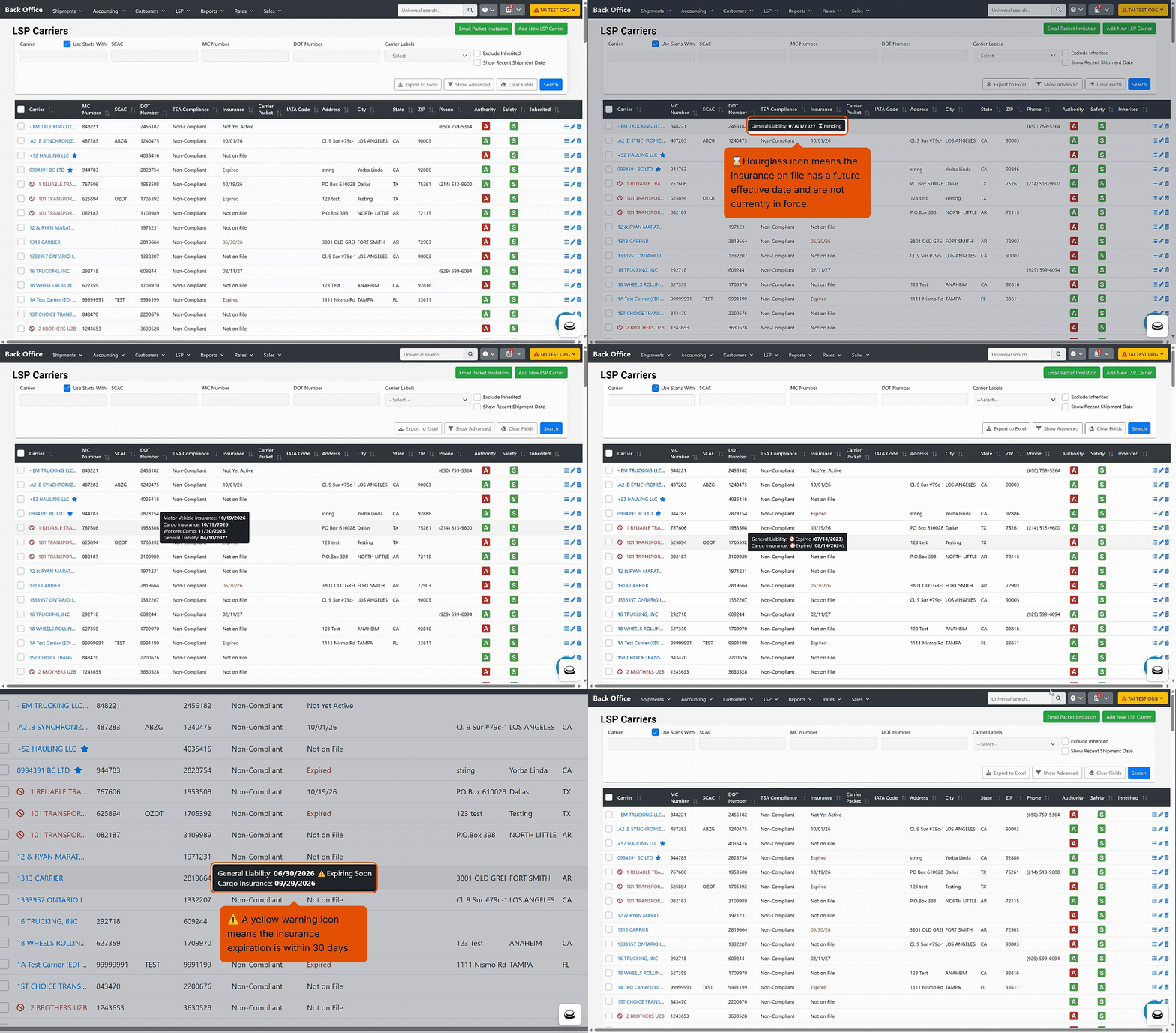 Brokers managing carrier insurance compliance directly now get a clearer, more complete view of expiration dates across the LSP Carrier Search Insurance column, its tooltip, and the Excel export.
- Smarter expiration logic — The Insurance column now surfaces the soonest upcoming expiration across all policy types on a carrier, flags the carrier as Expired if any single policy has lapsed, and shows Not Yet Active for coverage that hasn't started yet, so the status you see always reflects what needs attention first
- Hover for the full picture — A new tooltip on the Insurance cell breaks down every policy type on file with its individual expiration date, so you can see General Liability, Cargo, Motor Vehicle, and more at a glance without opening the carrier profile
- New export columns — The Excel export now includes dedicated General Liability Expiration and Cargo Insurance Expiration columns, so you can sort and filter by coverage type directly in Excel
Heads Up: v1 Public API Endpoints Being Deprecated on September 1st
Several v1 API endpoints have been deprecated and will soon return a Not Found response. If any internal integrations or workflows rely on these, now is the time to move to the v2 APIs.
Affected endpoints:
- /customer/verifyauthentication
- /marketplace/setShipmentStatus/Booked
- /shipping/shipmentStatus
- /shipping/setShipmentStatus/Canceled
- /shipping/setShipmentStatus/Delivered
- /shipping/setShipmentStatus/PickedUp
- /shipping/setShipmentStatus/Booked
- /shipping/customdocumentuploader
- /shipping/bookDomesticShipment