![TAI_LOGO_CMYK Option 1.2-03.jpg]](https://learn.tai-software.com/hs-fs/hubfs/TAI_LOGO_CMYK%20Option%201.2-03.jpg?height=40&name=TAI_LOGO_CMYK%20Option%201.2-03.jpg)
Steps to Void Insurance
-
Open the shipment with the purchased insurance.
-
Scroll down to the Insurance Transit Leg and locate the Void Certificate option.
-
Click Void Certificate

-
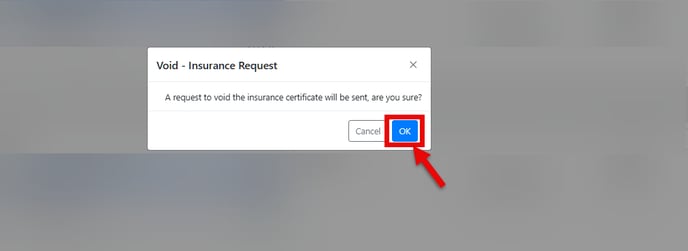
Click OK to confirm.
-
Wait for the confirmation message, the Certificate ID will be removed, and the policy will be marked as voided.

⚠️ Note: The original certificate document will remain in the shipment’s documents section. You’ll need to delete it manually if it’s no longer needed.
Important Notes
-
If a shipment is in transit or delivered status, the certificate cannot be voided.
-
Certificates older than 10 days also cannot be canceled.
-
Notify GLS at support@gogloballogistics.com if a load cancels or doesn’t move, so they can ensure that no charges are applied. This is because insurance certificates are generated automatically once the load is dispatched.