![TAI_LOGO_CMYK Option 1.2-03.jpg]](https://learn.tai-software.com/hs-fs/hubfs/TAI_LOGO_CMYK%20Option%201.2-03.jpg?height=40&name=TAI_LOGO_CMYK%20Option%201.2-03.jpg)
Why Use Location Masking?
When posting loads to public load boards, brokers often want to:
-
Avoid exposing exact shipper locations
-
Prevent carriers from bypassing broker relationships
-
Standardize posting locations for better market coverage
Where Location Masking Is Available
Location Masking is available in Truckload Quoting.
On the Shipment Info panel:
-
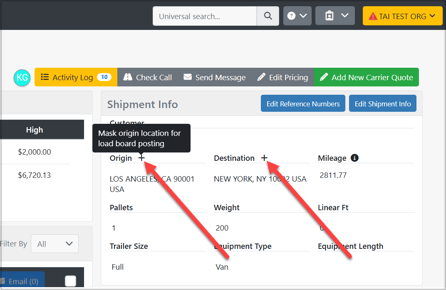
A plus (+) icon appears next to Origin and Destination
-
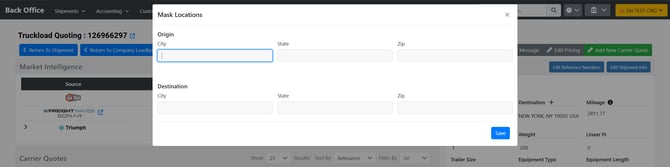
Clicking the icon opens the Mask Locations modal
In the modal, you can enter masked values for:
-
City
-
State
-
ZIP
You may mask:
-
Origin only
-
Destination only
-
Both origin and destination
Once saved:
-
The masked location is used only for load board postings
-
The actual shipment location remains unchanged in the system
Visual Indicator for Masked Locations
After masking is applied:
-
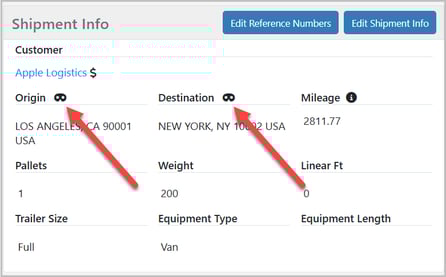
A mask indicator appears next to the Origin or Destination
-
This lets you quickly see that masked location data is being used
Supported Loadboard Integrations
Location Masking is supported when posting loads through the following integrations:
-
DAT
- KeepTruckin/Motive
- 123 Loadboard
- Dexfreight
- Loadboard Network
-
External Loadboards
- 10-4
Usage Considerations & Responsibility
Location Masking is an optional feature designed to give brokers flexibility when posting loads to supported load boards. Use of this feature is entirely at the discretion of the broker. Each load board maintains its own terms of service, posting guidelines, and enforcement policies. Brokers are responsible for ensuring their use of Location Masking complies with the rules and expectations of the load boards they choose to post to. Tai Software does not validate, monitor, or intervene in how masked locations are interpreted or enforced by third-party load boards or carriers. Any inquiries, disputes, or complaints related to masked postings are handled directly between the broker, the load board, and/or the carrier. By enabling and using Location Masking, the broker acknowledges and accepts full responsibility for its usage and any resulting outcomes.