![TAI_LOGO_CMYK Option 1.2-03.jpg]](https://learn.tai-software.com/hs-fs/hubfs/TAI_LOGO_CMYK%20Option%201.2-03.jpg?height=40&name=TAI_LOGO_CMYK%20Option%201.2-03.jpg)
Table of Contents
- What Is an Incomplete Shipment?
- When the Incomplete Shipment Alert Is Applied
- Incomplete Shipments from Email Processing
- When the Alert Is Resolved
- What the Alert Prevents
- Webhooks & Integrations
- Workflow Automation Behavior
- Shipment Search Behavior
- API Behavior
What Is an Incomplete Shipment?
A shipment is considered Incomplete when it is missing one or more required data elements needed to operate, rate, or account for the load.
When this happens:
-
The shipment is protected from downstream actions
-
Certain tools and integrations are disabled
-
The shipment remains visible for completion and review
When the Incomplete Shipment Alert Is Applied

The Incomplete Shipment alert is applied automatically when a shipment is created in the back office or customer portal without all required information:
-
Origin zip code
-
Destination zip code
-
At least one commodity with:
-
Pieces
-
Description
-
Total weight
-
Required shipment references
When the alert is applied:
-
The shipment status is set to Quote
-
The alert cannot be removed manually
Incomplete Shipments from Email Processing
Shipments created through Email Processing may be built with partial information when a quote or pickup request does not contain all required shipment details.
In these cases, the system creates the shipment using the data provided and applies the Incomplete Shipment alert to indicate that additional information is required before the shipment can proceed.
Email-processed requests that return a successful processing status are created as shipments even if required fields are missing, allowing brokers to capture demand early and complete the shipment later.
This behavior supports minimal shipment creation while ensuring incomplete shipments remain protected until all required information is added.
When the Alert Is Resolved
The Incomplete Shipment alert is automatically resolved once the shipment is updated to include all required information, specifically:
-
Origin zip code
-
Destination zip code
-
At least one complete commodity (pieces, description, total weight)
No manual action is needed. Once the shipment meets the requirements, the system clears the alert automatically.
What the Alert Prevents
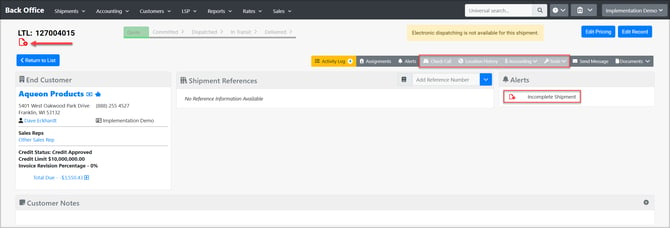
While the Incomplete Shipment alert is active, the system prevents actions that rely on complete shipment data.
The following are disabled:
-
Check Calls
-
Location History
-
Accounting
-
Tools
-
Webhooks and Subscribers
-
Workflow Automation actions that add or resolve alerts
-
Bulk alert actions involving this alert
This ensures incomplete shipments cannot move into execution, invoicing, billing, or automation prematurely.
Webhooks & Integrations
-
Shipments with the Incomplete Shipment alert do not trigger webhooks
-
Once the alert is resolved, the Shipment Create webhook is triggered automatically
-
This ensures downstream systems only receive complete shipment data
Workflow Automation Behavior
-
The Incomplete Shipment alert can be used as a filter
-
The alert cannot be added or resolved by workflow actions
-
This prevents automation rules from bypassing required data checks
Shipment Search Behavior
By default, incomplete shipments are excluded from shipment search results and are not displayed in Universal Search. This is intentional, as incomplete shipments follow the same principle as cancelled shipments.
Universal Search is designed to surface actionable, active records only. Since incomplete shipments are not considered active, they are hidden by default to keep results relevant and focused.
To include incomplete shipments when needed:
-
Enable the “Incomplete Shipments” checkbox in Shipment Search. This dedicated filter (also available in the Company Loadboard) allows users to specifically locate and review these shipments when required.
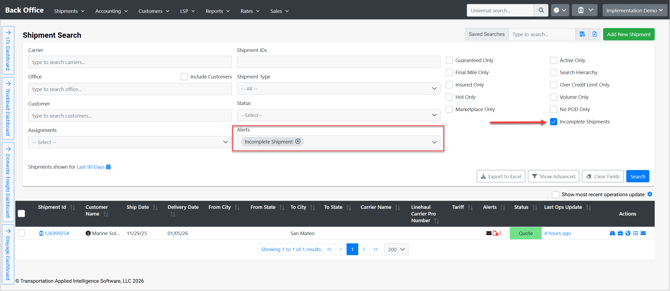
This allows teams to:
-
Find shipments awaiting completion
-
Review and finish required details without impacting active workflows
API Behavior
-
The Incomplete Shipment alert is read-only.
-
It is visible in alert retrieval endpoints (GET requests).
-
It cannot be added, resolved, or deleted through:
-
Public API requests
-
UI actions
-
Workflow Automation
-
Manual user actions
-
The system automatically applies and resolves this alert based on whether the shipment contains all required information.